An attacker places a malicious DLL on a writable network share. A colleague opens Zoom. The attacker's code executes inside the Zoom client. No credentials, no authentication bypass, no warning. CVE-2025-49457 is the flaw that makes this possible: a 9.6 CRITICAL DLL-hijacking vulnerability across every Zoom Windows product prior to version 6.3.10.
TLDR:
- CVE-2025-49457 is a CWE-426 DLL hijacking flaw in Zoom Windows clients, rated 9.6 CRITICAL by Zoom's CNA.
- An attacker can exploit this remotely, without credentials, via network access (one plausible mechanism: placing a malicious DLL on a reachable share, though Zoom's bulletin does not specify the exact delivery method).
- Update all affected Zoom Windows products to version 6.3.10 or later to remediate (ZSB-25030).
- Treat this as an ongoing patch-management input: Zoom has disclosed the same CWE-426 root class three times since 2024.
- ZeroPath publishes AI-generated CVE analyses to help security teams track and triage disclosures like this one.
What is CVE-2025-49457?
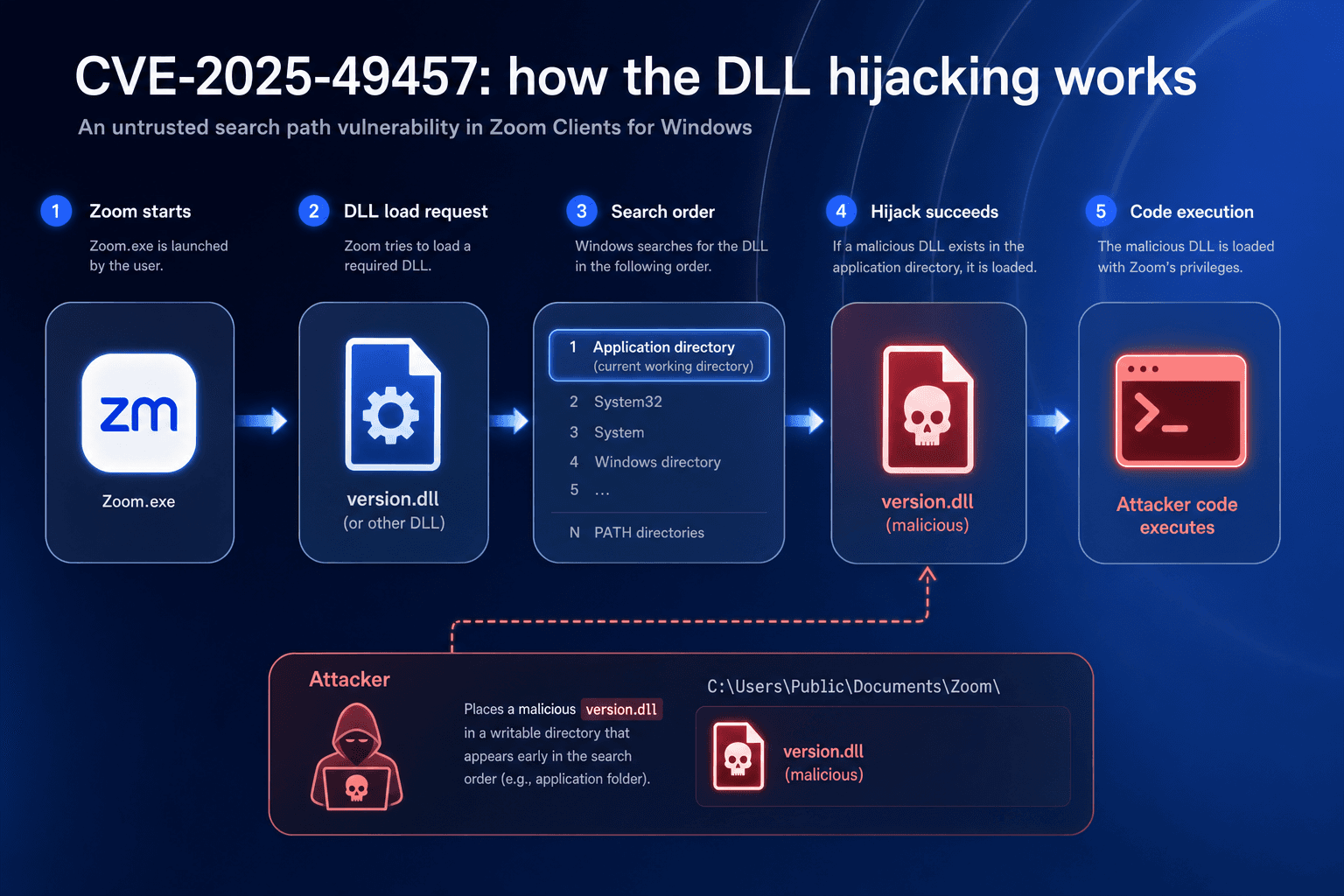
CVE-2025-49457 is a critical DLL hijacking flaw in Zoom Clients for Windows, classified under CWE-426 (Untrusted Search Path). The Zoom client loads DLLs without specifying absolute paths, so Windows follows its standard search order to resolve them. An attacker who places a malicious DLL in any directory that the search order visits before the legitimate library can cause Zoom to load and execute attacker-controlled code with the application's privileges. No credentials are required, and the attack works over the network by writing files to accessible network shares. Zoom's CNA scored this 9.6 CRITICAL, and every Zoom Windows product prior to version 6.3.10 carries the exposure.
CVE-2025-49457: how the DLL hijacking works
No public proof-of-concept code was available at the time of initial publication. PoC status can change after disclosure; verify current availability via NVD or GitHub before relying on this assessment.
Metric | CNA value (Zoom) | NIST value | Plain-English meaning |
|---|---|---|---|
Attack vector | Network | Network | Exploitable remotely over the network |
Attack complexity | Low | Low | No special conditions required |
Privileges required | None | None | No credentials needed |
User interaction | Required | Required | Victim must perform an action (e.g., launch Zoom from a writable share) |
Scope | Changed | Unchanged | CNA scores impact beyond Zoom's own process; NIST does not |
Confidentiality | High | High | Full read access to sensitive data possible |
Integrity | High | High | Attacker can modify or replace files |
Availability | High | High | Service can be disrupted or crashed |
Windows resolves unqualified DLL names by walking these locations in order until it finds a filename match: (1) the directory from which the application loaded, (2) the system directory (C:\Windows\System32), (3) the 16-bit system directory (C:\Windows\System), (4) the Windows directory (C:\Windows), (5) the current working directory at the time of the load call, and (6) directories listed in the PATH environment variable. When SafeDllSearchMode is on (the default since Windows XP SP2), the current working directory drops to position 5; when it is off, it moves to position 2, a far more dangerous configuration. An attacker who can write a DLL with the correct filename to any directory that appears before the legitimate library in this sequence will have it loaded and executed by Zoom.
How to patch CVE-2025-49457 in Zoom for Windows
Zoom has released patches to fix CVE-2025-49457. According to Zoom's official security bulletin ZSB-25030, users and organizations must update to the following fixed versions or later to mitigate this issue:
Step-by-step update procedure
- Open the Zoom desktop client, click your profile picture in the top-right corner, and select Check for Updates. If an update is available, install it and restart.
- Verify the installed version by opening Help > About Zoom and confirm the build is 6.3.10 or later (or 6.1.16 / 6.2.12 on VDI legacy tracks).
- For managed deployments, download the MSI installer for the relevant product from zoom.us/download and deploy via Group Policy, SCCM, or Intune using your standard software distribution workflow.
- For Zoom Rooms or Rooms Controller devices, update through the Zoom Rooms management portal or push the 6.3.10 MSI via your endpoint management tool.
- After deployment, run a version compliance report in your endpoint management tool to confirm no pre-6.3.10 instances remain in the environment.
Download the latest version from the official Zoom portal at zoom.us/download.
References for patch details:
- Zoom Security Bulletin
- ZSB-25030 (CVE-2025-49457)
Interim mitigations if immediate patching is not possible
Patching to 6.3.10 or later is the only full remediation, but the following compensating controls can reduce exposure while a rollout is in progress.
- Restrict write access to network shares: The attack requires placing a malicious DLL on a share reachable by the target host. Audit and tighten SMB share write permissions; only accounts that require write access for their role should have it.
- Deploy Windows Defender Application Control (WDAC) or AppLocker policies: Configure allowlist rules to prevent unsigned or untrusted DLLs from loading within the Zoom installation directory and its parent paths. This directly limits the DLL hijacking surface.
- Monitor for anomalous DLL loads: Use Sysmon (Event ID 7) or an EDR with DLL load telemetry to alert on the Zoom process loading unsigned libraries from non-standard paths. A DLL loaded from a UNC path or a temp directory is a high-confidence indicator of exploitation.
- Limit Zoom client exposure on sensitive hosts: On servers or privileged workstations where Zoom is not needed in practice, remove or disable the client until the patch can be applied.
None of these controls replace the patch. They narrow the exploitable window while a rollout is in progress.
Zoom Windows DLL hijacking: a recurring vendor pattern
CVE | ZSB Bulletin | Severity | CWE | Fixed In | Notes |
|---|---|---|---|---|---|
CVE-2024-24697 | ZSB-24015 | High | CWE-426 Untrusted Search Path | 5.17.11 | First publicly documented CWE-426 instance in Zoom Windows clients |
CVE-2025-49457 | ZSB-25030 | Critical (9.6) | CWE-426 Untrusted Search Path | 6.3.10 | Affects all Zoom Windows products; covered in this post |
CVE-2026-30906 | ZSB-26008 | High | CWE-426 Untrusted Search Path | See ZSB-26008 | Zoom Rooms for Windows, May 2026 |
2026 update: the pattern continues
As of June 2026, Zoom's Windows clients continue to surface privilege escalation and path-control issues at a steady pace. In March 2026, Zoom published four Windows-specific bulletins in a single patch cycle: a critical external control-of-file-name-or-path flaw in Zoom Workplace for Windows (ZSB-26005, CVE-2026-30903), improper privilege management in Zoom Clients for Windows (ZSB-26004, CVE-2026-30902), and two further Windows-only bugs. The May 2026 cycle added two more: an untrusted search path vulnerability in Zoom Rooms for Windows (ZSB-26008, CVE-2026-30906), the same root CWE-426 class as CVE-2025-49457, and an external control of file name or path flaw in the Zoom Workplace VDI Plugin for Windows (ZSB-26007, CVE-2026-30905). Then on June 9, 2026, Zoom published yet another Windows-specific bulletin: ZSB-26009 (CVE-2026-53406), targeting the Remote Control feature in Zoom Contact Center for Windows.
The cadence of quarterly Windows-specific bulletins, recurring DLL and path-handling flaws, and multiple critical-severity patches in 2026 alone confirms that patching CVE-2025-49457 is a point-in-time fix, not a permanent close. Organizations running Zoom on Windows should treat Zoom's security bulletin feed as a standing patch-management input and verify they are running the latest release after each quarterly cycle.
CVE-2025-49457 and ZeroPath: tracking Zoom Windows privilege escalation
When a flaw is exploitable over the network simply by writing a DLL to a reachable share, the window between disclosure and active exploitation is short. CVE-2025-49457 fits the exact profile that demands immediate attention: a widely deployed enterprise tool, a recurring CWE class (three CWE-426 disclosures in Zoom Windows clients since 2024), a 9.6 CVSS score, and a network-accessible attack vector that requires zero credentials. That is the kind of signal security teams need in front of them fast, not buried in a vendor RSS feed they check weekly.
ZeroPath, an AI-native application security platform, publishes AI-generated CVE analyses, including posts like this one, to help security teams track and respond to disclosures faster.
If your organization ships Windows applications, integrates the Zoom Meeting SDK, or writes any code that loads DLLs without absolute paths, the same root flaw class (CWE-426, Untrusted Search Path) can exist in your own codebase without a vendor advisory to flag it. ZeroPath's SAST analysis identifies path-handling and privilege escalation patterns, including the untrusted search path class behind CVE-2025-49457, before they reach production. The AI-native pipeline confirms reachability and exploitability for each finding with a mandatory source-to-sink trace, so your team reviews real bugs instead of a queue of theoretical path-handling warnings. That coverage spans SAST, SCA, secrets, and IaC in a single scan, completing in under one minute per PR. Fixes land directly in the PR, and ZeroPath re-runs verification after the merge to confirm the path is closed. That is the full solution loop for CWE-426: detect the untrusted search path pattern before it ships, confirm the DLL load reaches a vulnerable sink, fix it at the point of introduction, and verify the sink is closed before the code merges.
Final thoughts on CVE-2025-49457 and Zoom Windows security
CVE-2025-49457 is a clear reminder that widely deployed tools like Zoom carry real enterprise risk when DLL search path handling goes unchecked, and patching one disclosure does not close the door on the next. The recurring CWE-426 pattern in Zoom's Windows clients, now spanning three documented disclosures from 2024 through mid-2026, points to a systemic issue that defenders need to track continuously instead of treating as a one-time fix. If your team wants to stay ahead of privilege-escalation flaws in your code before they reach production, see ZeroPath in action.
FAQ
How does CVE-2025-49457 in Zoom for Windows actually work?
CVE-2025-49457 is a CWE-426 untrusted search path flaw in which the Zoom Windows client loads DLLs without absolute paths, causing Windows to walk its standard search order to resolve them. An attacker who places a malicious DLL in any directory that the search order visits before the legitimate library can execute attacker-controlled code with Zoom's privileges. No credentials are required, and the attack is exploitable over network access via a writable share.
What Zoom Windows versions fix CVE-2025-49457, and which products are affected?
Update to version 6.3.10 or later across all affected products: Zoom Workplace for Windows, Zoom Rooms for Windows, Zoom Rooms Controller for Windows, and Zoom Meeting SDK for Windows. Zoom Workplace VDI for Windows has an alternative remediation path at versions 6.1.16 or 6.2.12 on their respective legacy tracks. All updates are available through zoom.us/download.
Should I treat CVE-2025-49457 as a one-time patch or an ongoing monitoring commitment?
Treat it as an ongoing monitoring commitment. Zoom has disclosed the same CWE-426 root class three times since 2024, published four Windows-specific bulletins in a single March 2026 patch cycle, and disclosed yet another untrusted search path vulnerability in May 2026 with the same root flaw as CVE-2025-49457. Patching one disclosure closes one window; subscribing to Zoom's security bulletin feed and verifying your version after each quarterly cycle is the right posture.
Can ZeroPath's SAST scanner catch CWE-426 untrusted search path patterns in my own Windows application code?
Yes. ZeroPath's SAST pipeline identifies path-handling and privilege-escalation patterns, including the class of untrusted search-path flaws behind CVE-2025-49457, before they reach production. Each confirmed finding includes a mandatory source-to-sink trace and exploitability score, so your team reviews only real bugs instead of a queue of theoretical path-handling warnings that don't reach vulnerable sinks.
What is the best way to stay ahead of privilege-escalation flaws like CVE-2025-49457 in the code your team ships?
Shift detection left into the PR. CWE-426 and related privilege escalation patterns are catchable statically. The problem is that most teams find them after deployment, either through a vendor advisory or a breach. Running SAST with reachability analysis on every PR surfaces these flaws at the point of introduction, with enough context to confirm whether the path is actually exploitable instead of just syntactically suspicious.