AI INVENTORY
Keep the AI in your code in plain sight.
Most teams can't say what AI is actually running in their code. ZeroPath finds it for you: the SDKs, agents, MCP servers, and model files your apps and coding assistants pull in, without a separate scan.
Shadow AI is still AI. Every agent your team wires in is attack surface. ZeroPath makes it visible.
Seventeen kinds of component, from LLM SDKs and agent frameworks to MCP servers, model files, and prompt configs. If it's AI and it's in your code, it turns up here.
Every component carries a usage (Runtime, Dev Tooling, Ambiguous), a tier (GenAI or classic ML), and a provider, so it's clear what each one is doing in your stack.
Model weights are identified by their file signature, not their name, so a renamed GGUF, SafeTensors, ONNX, or PyTorch file can't slip past. It's a check, not a guess.
What AI Inventory Covers
Everything from the models you ship to the tools your developers build with, across all seventeen component kinds.
Runtime AI
The LLM SDKs and inference clients your application calls in production, tagged Runtime usage with their provider, so you can see the AI your software actually ships.
Models & datasets
Model weight files and datasets in your repository, with weights magic-byte-verified across GGUF, SafeTensors, ONNX, and PyTorch rather than inferred from a file name.
Agent & MCP tooling
The agent frameworks and MCP servers your team wires in. A normal dependency scan never names them. Here, they're tracked like anything else.
Dev-time AI
The AI in your toolchain (prompt configs and dev-tooling components) tagged Dev Tooling usage, so build-time AI is distinguished from what runs in production.
How It Works
No Extra Scan to Run
AI Inventory rides along with the SCA and full scans you already run. It records what's there and stops at that: no findings, no scores, no patches. So it never adds review noise, and it never adds LLM cost.
Nothing to Set Up
Discovery happens during scans you have already scheduled. There is nothing new to install, turn on, or configure.
Inherits Reachability
When a component comes from a dependency, it picks up the reachability ZeroPath already works out for that dependency.
Exports to AI-BOM
The recorded inventory feeds a standards-format CycloneDX AI-BOM you can hand to auditors, customers, and your SBOM tooling.
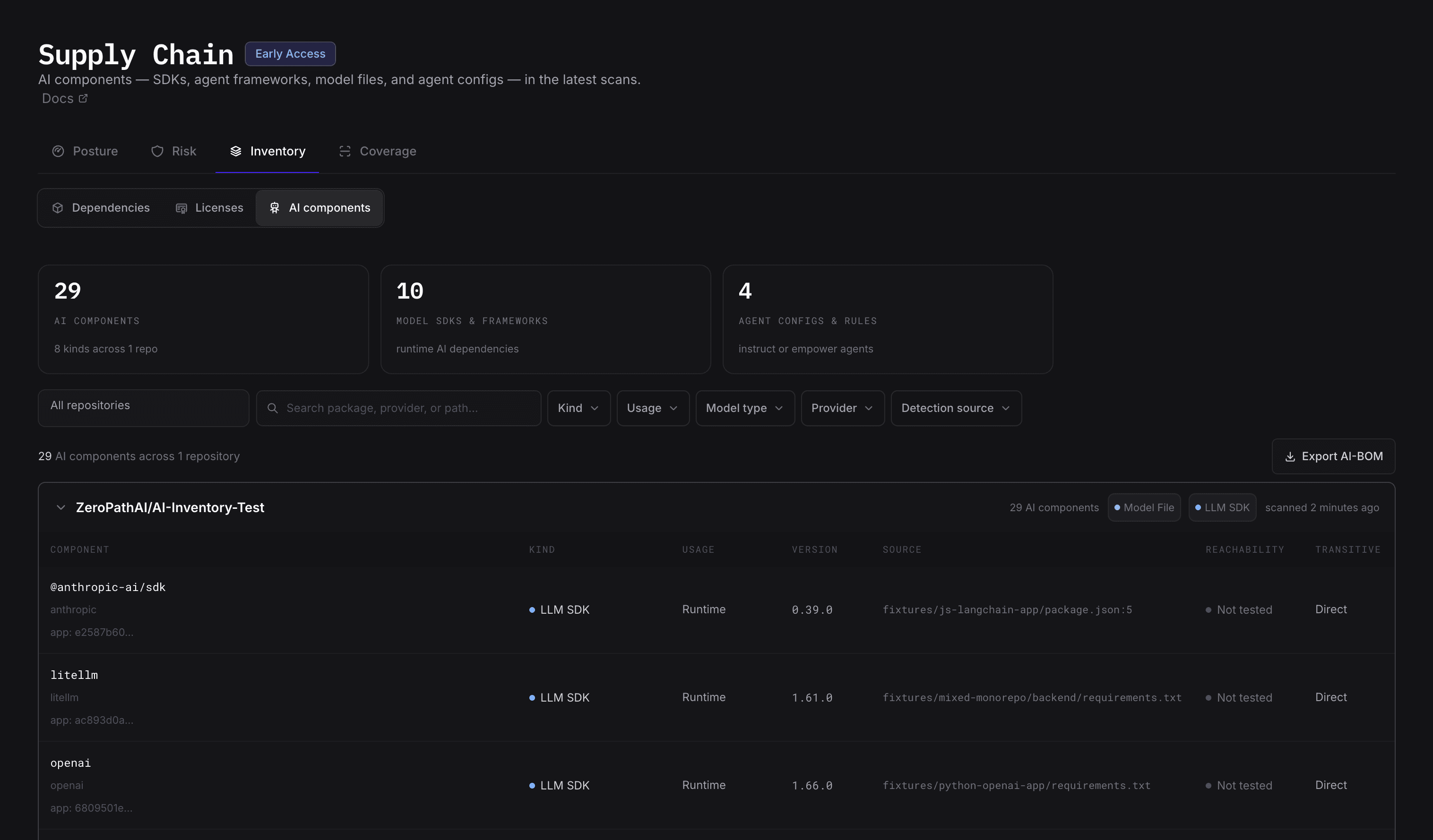
Part of Supply Chain
One View Across Your Supply Chain
AI components sit right next to your code, dependency, and container findings. The agents, SDKs, and MCP servers a normal dependency scan walks past finally show up in the same place as everything else.
17 Component Kinds
From LLM SDKs to MCP servers, the whole AI surface is tracked alongside everything else ZeroPath already watches.
Deterministic by Design
Detection reads file signatures instead of asking a model, so you get the same answer every run.
Ready to Export
Turn the inventory into a standards-format CycloneDX AI-BOM whenever auditors or customers ask.
SAST + SCA + Containers + AI Inventory
One View
Cover the whole path to production in one platform, from the code you write to the AI you ship.
- SAST finds issues in your code
- SCA covers your declared dependencies
- Container scanning covers what actually ships
- AI Inventory covers the AI, agents, and MCP servers in your code


